Hugo Site Setup Log
This note records the practical Hugo workflow from installation to project initialization. Follow the steps below to complete the basic site setup.
1. Install Hugo
On Windows, you can install Hugo in the following order:
- Create a
hugofolder. - Create a
binsubfolder under thehugodirectory. - Download the Hugo package from GitHub and extract it into the
binsubfolder. - Add the
binfolder path to your system environment variables.
Search for environment variables in the system settings and add the path:
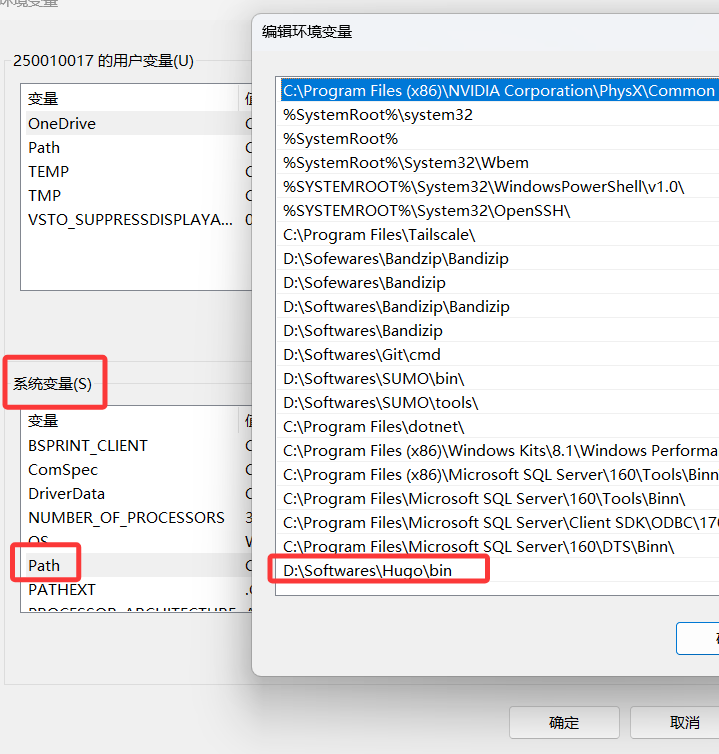
Open PowerShell and verify that Hugo is installed successfully:
hugo version
2. Create a Site and Configure a Theme
Run the following commands to initialize the site and add a theme:
hugo new site <folder-name>
cd <folder-name>

# Customize theme (optional step)
git init
git submodule add <theme-repo-url>
echo "theme = '<theme-name>'" >> hugo.toml
3. Regenerate the public Directory
After basic configuration, run the following command to regenerate the site output:
Hugo